1  机器学习概览

我们使用deliveries数据集来说明机器学习的基本过程。

library(tidymodels)
library(patchwork)
tidymodels_prefer()

load("data/RData/deliveries.RData")
glimpse(deliveries)
Rows: 10,012
Columns: 31
$ time_to_delivery <dbl> 16.1106, 22.9466, 30.2882, 33.4266, 27.2255, 19.6459,…
$ hour             <dbl> 11.899, 19.230, 18.374, 15.836, 19.619, 12.952, 15.47…
$ day              <fct> Thu, Tue, Fri, Thu, Fri, Sat, Sun, Thu, Fri, Sun, Tue…
$ distance         <dbl> 3.15, 3.69, 2.06, 5.97, 2.52, 3.35, 2.46, 2.21, 2.62,…
$ item_01          <int> 0, 0, 0, 0, 0, 1, 0, 0, 0, 0, 0, 0, 0, 1, 0, 0, 0, 0,…
$ item_02          <int> 0, 0, 0, 0, 0, 0, 0, 0, 0, 2, 0, 0, 0, 1, 0, 0, 0, 1,…
$ item_03          <int> 2, 0, 0, 0, 0, 0, 1, 1, 0, 1, 0, 0, 0, 0, 1, 0, 0, 0,…
$ item_04          <int> 0, 0, 0, 0, 1, 1, 1, 0, 0, 0, 1, 0, 1, 0, 0, 0, 0, 0,…
$ item_05          <int> 0, 0, 1, 0, 0, 0, 0, 0, 0, 0, 0, 0, 0, 0, 0, 0, 0, 0,…
$ item_06          <int> 0, 0, 0, 0, 0, 0, 0, 1, 0, 0, 0, 0, 0, 0, 0, 1, 0, 0,…
$ item_07          <int> 0, 0, 0, 0, 1, 1, 0, 0, 1, 0, 0, 0, 0, 0, 0, 1, 0, 0,…
$ item_08          <int> 0, 0, 0, 0, 0, 0, 0, 1, 0, 0, 1, 0, 1, 0, 0, 0, 1, 0,…
$ item_09          <int> 0, 0, 0, 0, 0, 1, 0, 0, 0, 0, 0, 0, 1, 0, 1, 0, 0, 0,…
$ item_10          <int> 1, 0, 0, 0, 0, 0, 0, 0, 0, 0, 0, 1, 0, 0, 0, 0, 0, 0,…
$ item_11          <int> 1, 0, 0, 0, 1, 1, 0, 0, 0, 0, 0, 0, 0, 0, 0, 0, 0, 0,…
$ item_12          <int> 0, 0, 0, 1, 0, 0, 0, 0, 0, 1, 0, 0, 0, 0, 0, 0, 0, 0,…
$ item_13          <int> 0, 0, 0, 0, 0, 0, 0, 0, 0, 0, 0, 0, 0, 0, 0, 0, 0, 0,…
$ item_14          <int> 0, 0, 0, 0, 1, 0, 0, 0, 0, 0, 0, 0, 0, 0, 0, 0, 0, 0,…
$ item_15          <int> 0, 0, 0, 0, 0, 0, 0, 0, 1, 0, 0, 0, 0, 0, 0, 0, 0, 0,…
$ item_16          <int> 0, 0, 0, 0, 0, 0, 0, 0, 0, 0, 0, 0, 0, 0, 0, 0, 0, 0,…
$ item_17          <int> 0, 0, 0, 0, 0, 0, 0, 0, 0, 1, 0, 0, 0, 0, 0, 0, 0, 0,…
$ item_18          <int> 0, 1, 0, 0, 0, 0, 0, 0, 0, 1, 0, 0, 0, 0, 0, 1, 1, 0,…
$ item_19          <int> 0, 0, 0, 0, 0, 0, 0, 0, 0, 0, 0, 0, 0, 0, 0, 0, 0, 0,…
$ item_20          <int> 0, 0, 1, 0, 0, 0, 0, 0, 0, 0, 0, 0, 0, 0, 0, 0, 0, 0,…
$ item_21          <int> 0, 0, 0, 0, 0, 0, 0, 1, 0, 0, 0, 0, 0, 0, 0, 0, 0, 0,…
$ item_22          <int> 0, 0, 0, 0, 0, 1, 1, 0, 0, 1, 0, 0, 0, 1, 0, 0, 0, 0,…
$ item_23          <int> 0, 0, 0, 0, 0, 0, 0, 0, 0, 0, 0, 0, 0, 0, 0, 0, 0, 0,…
$ item_24          <int> 0, 0, 1, 0, 0, 1, 0, 0, 0, 0, 0, 0, 0, 0, 0, 0, 0, 0,…
$ item_25          <int> 0, 0, 0, 0, 0, 0, 0, 0, 0, 0, 1, 0, 0, 0, 0, 0, 0, 1,…
$ item_26          <int> 0, 0, 0, 0, 0, 0, 0, 0, 1, 0, 0, 1, 0, 0, 0, 0, 0, 0,…
$ item_27          <int> 0, 0, 0, 1, 1, 0, 0, 0, 0, 0, 0, 1, 1, 0, 0, 0, 0, 0,…
该示例重点关注预测食品配送时间(即从下单到收到食品的时间)。数据集包含某特定餐厅的 10,012 笔订单。预测变量(包括:

结果变量为:time_to_delivery,以分钟为单位。

1.1 数据划分

Chapter 2 有针对数据划分的详细说明。
set.seed(991)
delivery_split <- initial_validation_split(
  deliveries,
  prop = c(0.6, 0.2),
  strata = time_to_delivery
)

# split data
delivery_train <- training(delivery_split)
delivery_test <- testing(delivery_split)
delivery_val <- validation(delivery_split)

1.2 EDA-recipe

Chapter 5Chapter 4 有针对数据预处理的详细说明。

EDA主要是帮助我们对数据有一个初步的了解,发现数据中的一些问题,并为后续的数据预处理和建模提供指导。EDA通常包括(但不仅限于)以下几个步骤,且通常以可视化的形式进行展示:

  1. 数据概览:查看数据的结构、变量类型和缺失值情况。
  2. 单变量分析:对每个变量进行描述性统计分析和可视化,了解其分布情况。
  3. 多变量分析:探索多个变量之间的关系,识别潜在的模式和趋势。
day_cols <- c(
  "#000000FF",
  "#24FF24FF",
  "#009292FF",
  "#B66DFFFF",
  "#6DB6FFFF",
  "#920000FF",
  "#FFB6DBFF"
)

delivery_dist <- delivery_train |>
  ggplot(aes(x = distance, y = time_to_delivery)) +
  geom_point(alpha = 0.1, cex = 1) +
  labs(
    title = "(a)",
    x = "配送距离 (英里)",
    y = "交货时间 (分钟)"
  ) +
  geom_smooth(se = F, col = "red")

delivery_time <- delivery_train |>
  ggplot(aes(x = hour, y = time_to_delivery)) +
  geom_point(alpha = 0.1, cex = 1) +
  labs(
    title = "(b)",
    x = "订单时间 (小时)",
    y = "交货时间 (分钟)"
  ) +
  geom_smooth(se = F, col = "red")

delivery_day <- delivery_train |>
  ggplot(aes(x = day, y = time_to_delivery, col = day)) +
  geom_boxplot(show.legend = F) +
  labs(
    title = "(c)",
    x = "订单日期",
    y = "交货时间 (分钟)",
  ) +
  scale_color_manual(values = day_cols)

delivery_time_day <- delivery_train %>%
  ggplot(aes(x = hour, time_to_delivery, col = day)) +
  labs(
    y = "交货时间(分钟)",
    x = "订单时间 (小时)",
    title = "(d)"
  ) +
  geom_smooth(se = FALSE) +
  scale_color_manual(values = day_cols)

(delivery_dist + delivery_time) /
  (delivery_day + delivery_time_day) +
  plot_layout(guides = "collect") &
  theme(legend.title = element_blank(), legend.position = "bottom")

此外,我们还关注变量item_01item_27,这些变量表示订单中不同菜单项的数量。目标变量是time_to_delivery,表示从下单到收到食品的时间(以分钟为单位),那么我们可能还需关注某个订单如果包含这些菜单项,是否会影响配送时间。

  1. 建立一个自定函数,接收数据集和我们感兴趣的统计量(本例中我们关注置信区间,所以关注平均值),函数中:
  • 使用pivot_longer()函数将数据从宽格式转换为长格式,以便更容易地进行分组和计算。
  • 使用pivot_wider()函数将数据重新转换为宽格式,以便更好地展示结果。
  1. 在训练集上使用该函数,测试函数是否正确运行。

  2. 对训练集使用重采样,对每个重采样都使用该函数,计算每个菜单项的统计量。

time_ratios <- function(x) {
  x |>
    pivot_longer(
      cols = starts_with("item_"),
      names_to = "predictor",
      values_to = "count"
    ) |>
    mutate(ordered = ifelse(count > 0, "yes", "no")) |>
    summarise(
      mean = mean(time_to_delivery),
      .by = c(predictor, ordered)
    ) |>
    pivot_wider(
      id_cols = predictor,
      names_from = ordered,
      values_from = mean
    ) |>
    mutate(ratio = yes / no) |>
    select(term = predictor, estimate = ratio)
}

# use the function on the training set
time_ratios(delivery_train)
# A tibble: 27 × 2
   term    estimate
   <chr>      <dbl>
 1 item_01     1.07
 2 item_02     1.01
 3 item_03     1.01
 4 item_04     1.00
 5 item_05     1.00
 6 item_06     1.02
 7 item_07     1.02
 8 item_08     1.01
 9 item_09     1.02
10 item_10     1.08
# ℹ 17 more rows

结果值为1.07意味着当订单中至少包含该商品一次时,交货时间将增加7%。

使用重采样来评估这些估计值的稳定性,我们采用90%的置信度。主要使用到的函数有:

  • bootstraps(),该函数用于生成重采样数据集。
  • analysis(),该函数用于提取重采样数据集中的分析数据(即原始数据)。
  • int_pctl(),该函数接收重采样(例如bootstraps`)数据集,并计算每个重采样的统计量,然后计算这些统计量的百分位数,以形成置信区间。
# resample the training set
set.seed(624)
resample_data <- delivery_train |>
  select(time_to_delivery, starts_with("item_")) |>
  bootstraps(times = 1000)
resample_data
# Bootstrap sampling 
# A tibble: 1,000 × 2
   splits              id           
   <list>              <chr>        
 1 <split [6004/2227]> Bootstrap0001
 2 <split [6004/2197]> Bootstrap0002
 3 <split [6004/2156]> Bootstrap0003
 4 <split [6004/2210]> Bootstrap0004
 5 <split [6004/2208]> Bootstrap0005
 6 <split [6004/2227]> Bootstrap0006
 7 <split [6004/2202]> Bootstrap0007
 8 <split [6004/2204]> Bootstrap0008
 9 <split [6004/2151]> Bootstrap0009
10 <split [6004/2229]> Bootstrap0010
# ℹ 990 more rows
# extract the analysis data
resample_ratios <- resample_data |>
  mutate(stats = map(splits, \(x) time_ratios(analysis(x))))
resample_ratios
# Bootstrap sampling 
# A tibble: 1,000 × 3
   splits              id            stats            
   <list>              <chr>         <list>           
 1 <split [6004/2227]> Bootstrap0001 <tibble [27 × 2]>
 2 <split [6004/2197]> Bootstrap0002 <tibble [27 × 2]>
 3 <split [6004/2156]> Bootstrap0003 <tibble [27 × 2]>
 4 <split [6004/2210]> Bootstrap0004 <tibble [27 × 2]>
 5 <split [6004/2208]> Bootstrap0005 <tibble [27 × 2]>
 6 <split [6004/2227]> Bootstrap0006 <tibble [27 × 2]>
 7 <split [6004/2202]> Bootstrap0007 <tibble [27 × 2]>
 8 <split [6004/2204]> Bootstrap0008 <tibble [27 × 2]>
 9 <split [6004/2151]> Bootstrap0009 <tibble [27 × 2]>
10 <split [6004/2229]> Bootstrap0010 <tibble [27 × 2]>
# ℹ 990 more rows
resample_ratios$stats[[1]] # 查看第一个重采样的结果
# A tibble: 27 × 2
   term    estimate
   <chr>      <dbl>
 1 item_01     1.07
 2 item_02     1.02
 3 item_03     1.01
 4 item_04     1.01
 5 item_05     1.02
 6 item_06     1.01
 7 item_07     1.03
 8 item_08     1.02
 9 item_09     1.03
10 item_10     1.08
# ℹ 17 more rows
# calculate the confidence intervals
resample_ci <- resample_ratios |>
  int_pctl(stats, alpha = 0.1)
resample_ci
# A tibble: 27 × 6
   term    .lower .estimate .upper .alpha .method   
   <chr>    <dbl>     <dbl>  <dbl>  <dbl> <chr>     
 1 item_01  1.05       1.07   1.10    0.1 percentile
 2 item_02  0.995      1.01   1.02    0.1 percentile
 3 item_03  0.994      1.01   1.02    0.1 percentile
 4 item_04  0.988      1.00   1.02    0.1 percentile
 5 item_05  0.988      1.00   1.02    0.1 percentile
 6 item_06  1.00       1.02   1.03    0.1 percentile
 7 item_07  1.01       1.02   1.04    0.1 percentile
 8 item_08  0.994      1.01   1.02    0.1 percentile
 9 item_09  1.00       1.02   1.03    0.1 percentile
10 item_10  1.06       1.08   1.10    0.1 percentile
# ℹ 17 more rows
# plot the results
resample_ci |>
  mutate(
    term = gsub("_0", " ", term),
    term = factor(gsub("_", " ", term)),
    term = reorder(term, .estimate),
    increase = .estimate - 1
  ) |>
  ggplot(aes(increase, term)) +
  geom_vline(xintercept = 0, lty = 2, col = "red") +
  geom_point() +
  geom_errorbar(aes(xmin = .lower - 1, xmax = .upper - 1), width = 1 / 2) +
  scale_x_continuous(labels = scales::percent) +
  labs(y = NULL, x = "交货时间增加") +
  theme(axis.title.y = element_text(hjust = 0.5))

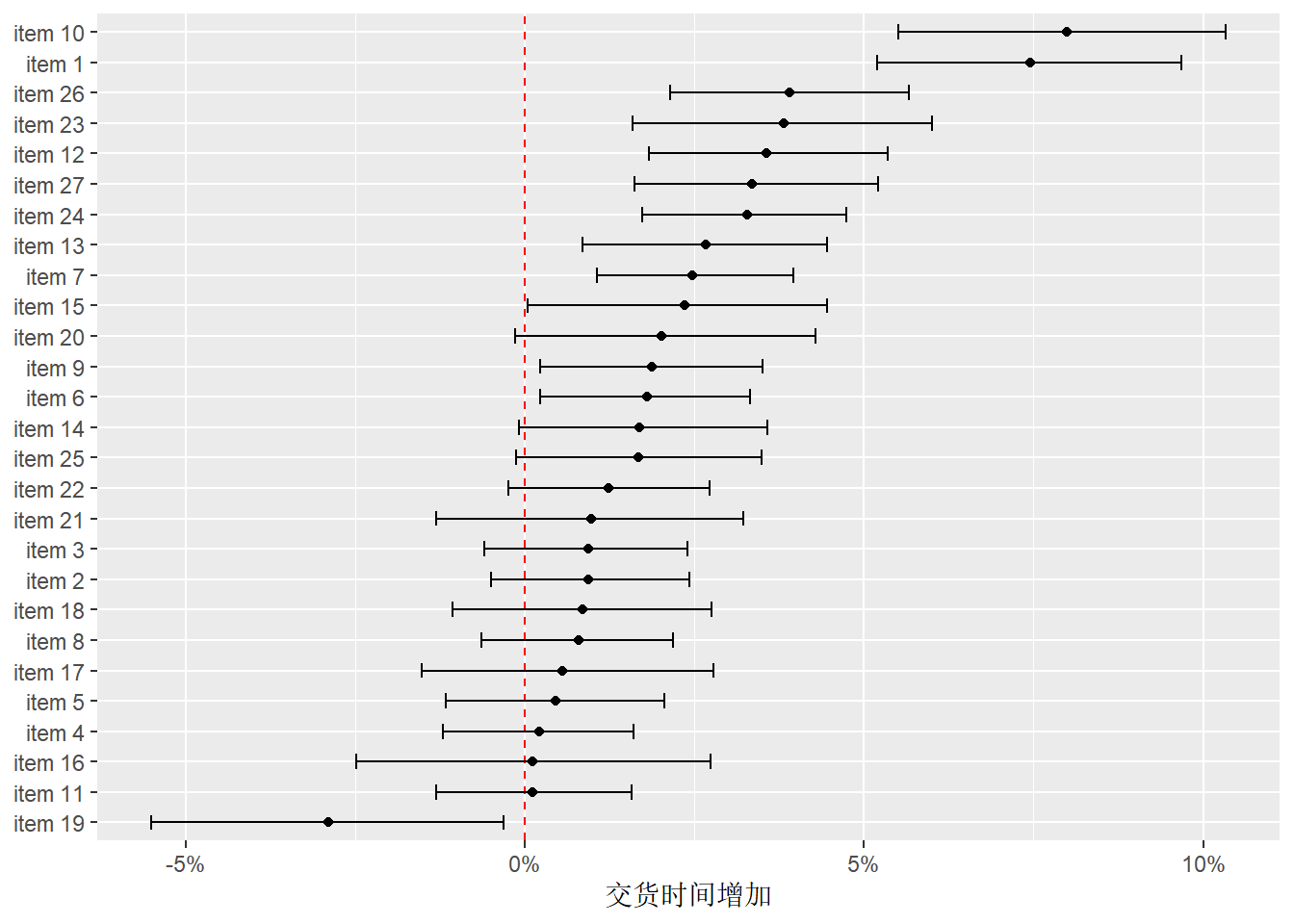
上图显示了每个菜单项对交货时间的影响。红色虚线表示没有影响(即交货时间不变)。

  • 如果某个菜单项的点和误差条完全在红线的右侧,说明该菜单项会显著增加交货时间,如item10和item1。
  • 如果完全在左侧,则说明会显著减少交货时间,如item19。
  • 如果误差条跨过红线,则说明该菜单项对交货时间没有显著影响。

1.2.1 EDA小结

通过EDA,我们发现:

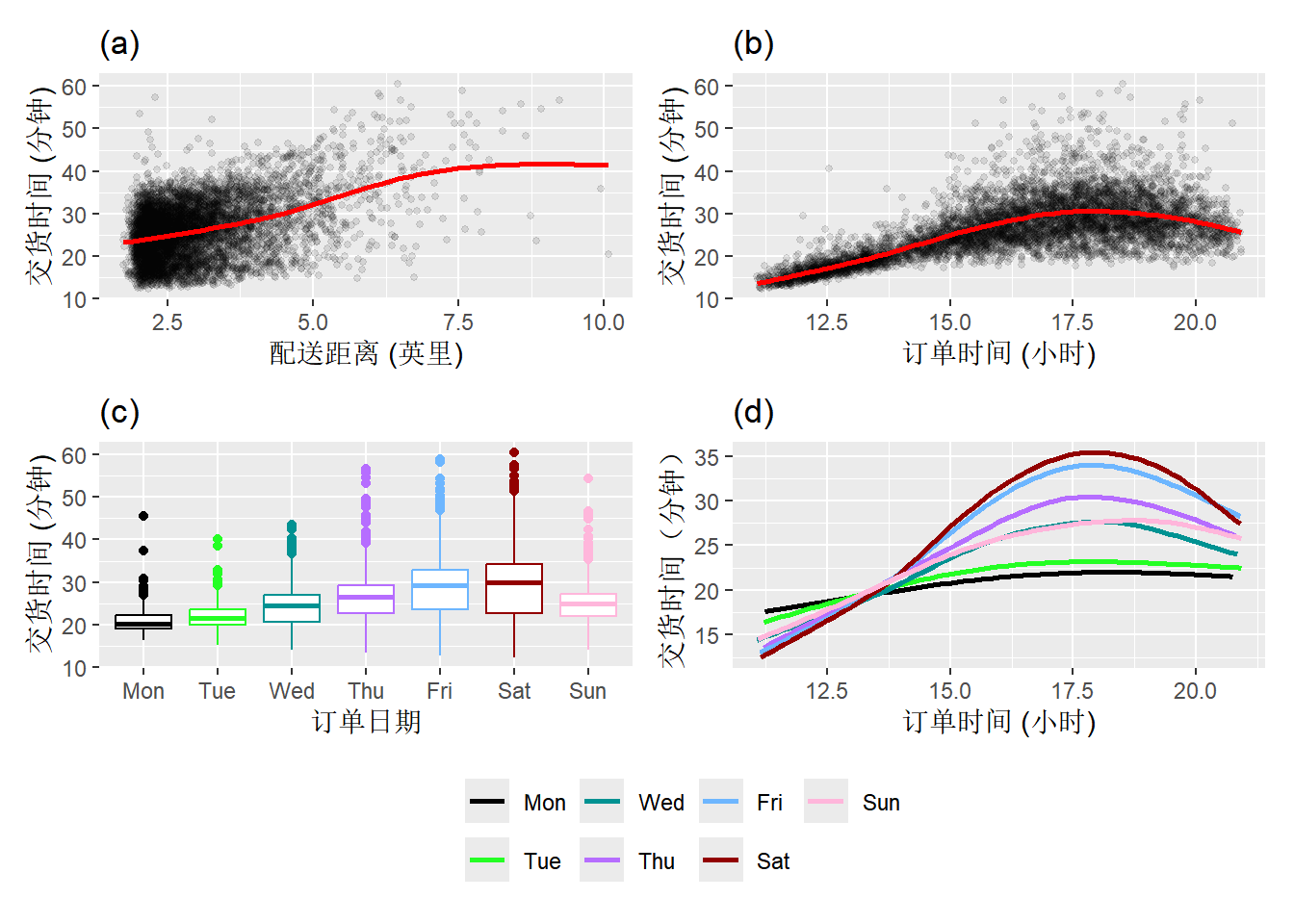
  • 结果变量与订单时间之间存在非线性关系。
  • 这种非线性的关系在不同日期表现各异,这是定性预测变量( 日期 )与另一个变量( 小时 )的非线性函数之间的交互作用效应。
  • 此外,似乎还存在一个与订单距离相关的、额外的非线性效应。

1.3 模型建立和选择

Section 4 和@sec-classification-measure-index 有针对评判指标的详细说明。

模型建立和选择有几个基本的步骤:

  1. 预处理(recipe)。
  2. 指定模型算法(parsnip)。
  3. 选择合适的指标,评估模型效果(yardstick)。
  4. 模型校准(tune)。

我们使用相对简单的线性回归模型来说明整个过程。

# specify the recipe
spline_rec <- recipe(time_to_delivery ~ ., data = delivery_train) |>
  step_dummy(all_factor_predictors()) |> # one-hot encode categorical predictors
  step_zv(all_predictors()) |> # remove zero-variance predictors
  step_ns(hour, distance, deg_free = 10) |> # natural cubic spline
  step_interact(~ starts_with("hour_"):starts_with("day_")) # interaction terms
spline_rec

# specify the model
lm_reg_spec <- linear_reg()

# create the workflow
lm_reg_wflow <- workflow() |>
  add_recipe(spline_rec) |>
  add_model(lm_reg_spec)
lm_reg_wflow
══ Workflow ════════════════════════════════════════════════════════════════════
Preprocessor: Recipe
Model: linear_reg()

── Preprocessor ────────────────────────────────────────────────────────────────
4 Recipe Steps

• step_dummy()
• step_zv()
• step_ns()
• step_interact()

── Model ───────────────────────────────────────────────────────────────────────
Linear Regression Model Specification (regression)

Computational engine: lm 
# fit the model
lm_reg_fit <- lm_reg_wflow |>
  fit(data = delivery_train)

# model summary-use tidy
tidy(lm_reg_fit)
# A tibble: 114 × 5
   term        estimate std.error statistic  p.value
   <chr>          <dbl>     <dbl>     <dbl>    <dbl>
 1 (Intercept)   13.3      1.58        8.42 4.66e-17
 2 item_01        1.24     0.103      12.1  3.50e-33
 3 item_02        0.646    0.0687      9.41 6.85e-21
 4 item_03        0.731    0.0691     10.6  6.46e-26
 5 item_04        0.282    0.0626      4.50 6.78e- 6
 6 item_05        0.584    0.0787      7.42 1.36e-13
 7 item_06        0.525    0.0720      7.29 3.46e-13
 8 item_07        0.506    0.0710      7.13 1.10e-12
 9 item_08        0.638    0.0672      9.49 3.42e-21
10 item_09        0.737    0.0758      9.72 3.51e-22
# ℹ 104 more rows
# predict on the validation set-use augment
lm_reg_val_pred <- augment(lm_reg_fit, new_data = delivery_val)
lm_reg_val_pred
# A tibble: 2,004 × 33
   .pred   .resid time_to_delivery  hour day   distance item_01 item_02 item_03
   <dbl>    <dbl>            <dbl> <dbl> <fct>    <dbl>   <int>   <int>   <int>
 1  30.1 -2.90                27.2  19.6 Fri       2.52       0       0       0
 2  23.0 -0.918               22.1  15.5 Sun       2.46       0       0       1
 3  28.4 -1.75                26.6  17.0 Thu       2.21       0       0       1
 4  31.0 -0.206               30.8  16.7 Fri       2.62       0       0       0
 5  38.6  2.59                41.2  16.4 Fri       5.16       0       0       0
 6  27.0 -0.00844             27.0  17.1 Thu       2.11       0       0       0
 7  21.6 -0.743               20.8  14.9 Thu       2.22       0       0       0
 8  18.7 -1.75                17.0  12.3 Sat       3.88       0       0       0
 9  26.3 -0.610               25.7  16.6 Thu       2.08       0       0       0
10  19.9 -0.410               19.5  13.5 Tue       3.55       0       0       0
# ℹ 1,994 more rows
# ℹ 24 more variables: item_04 <int>, item_05 <int>, item_06 <int>,
#   item_07 <int>, item_08 <int>, item_09 <int>, item_10 <int>, item_11 <int>,
#   item_12 <int>, item_13 <int>, item_14 <int>, item_15 <int>, item_16 <int>,
#   item_17 <int>, item_18 <int>, item_19 <int>, item_20 <int>, item_21 <int>,
#   item_22 <int>, item_23 <int>, item_24 <int>, item_25 <int>, item_26 <int>,
#   item_27 <int>
# evaluate the model performance on the validation set
reg_metrics <- metric_set(mae)
lm_reg_val_pred |>
  reg_metrics(truth = time_to_delivery, estimate = .pred)
# A tibble: 1 × 3
  .metric .estimator .estimate
  <chr>   <chr>          <dbl>
1 mae     standard        1.61

以上为单独使用验证集的情况,我们知道,验证集可以视为对数据的单次重采样,如此我们可以使用fit_resamples()函数来简便的完成以上操作。

# 生成重采样集
delivery_rs <- validation_set(delivery_split)
class(delivery_rs)
[1] "validation_set" "rset"           "tbl_df"         "tbl"           
[5] "data.frame"    
# 使用fit_resamples()函数
lm_reg_res <- fit_resamples(
  lm_reg_wflow,
  resamples = delivery_rs,
  metrics = reg_metrics,
  control = control_resamples(save_pred = TRUE, save_workflow = TRUE)
)

# 获取结果
collect_predictions(lm_reg_res) # 获取预测值
# A tibble: 2,004 × 5
   .pred id         time_to_delivery  .row .config        
   <dbl> <chr>                 <dbl> <int> <chr>          
 1  30.1 validation             27.2  6005 pre0_mod0_post0
 2  23.0 validation             22.1  6006 pre0_mod0_post0
 3  28.4 validation             26.6  6007 pre0_mod0_post0
 4  31.0 validation             30.8  6008 pre0_mod0_post0
 5  38.6 validation             41.2  6009 pre0_mod0_post0
 6  27.0 validation             27.0  6010 pre0_mod0_post0
 7  21.6 validation             20.8  6011 pre0_mod0_post0
 8  18.7 validation             17.0  6012 pre0_mod0_post0
 9  26.3 validation             25.7  6013 pre0_mod0_post0
10  19.9 validation             19.5  6014 pre0_mod0_post0
# ℹ 1,994 more rows
collect_metrics(lm_reg_res) # 获取评估指标
# A tibble: 1 × 6
  .metric .estimator  mean     n std_err .config        
  <chr>   <chr>      <dbl> <int>   <dbl> <chr>          
1 mae     standard    1.61     1      NA pre0_mod0_post0
# 可视化预测结果
library(probably)
cal_plot_regression(lm_reg_res)

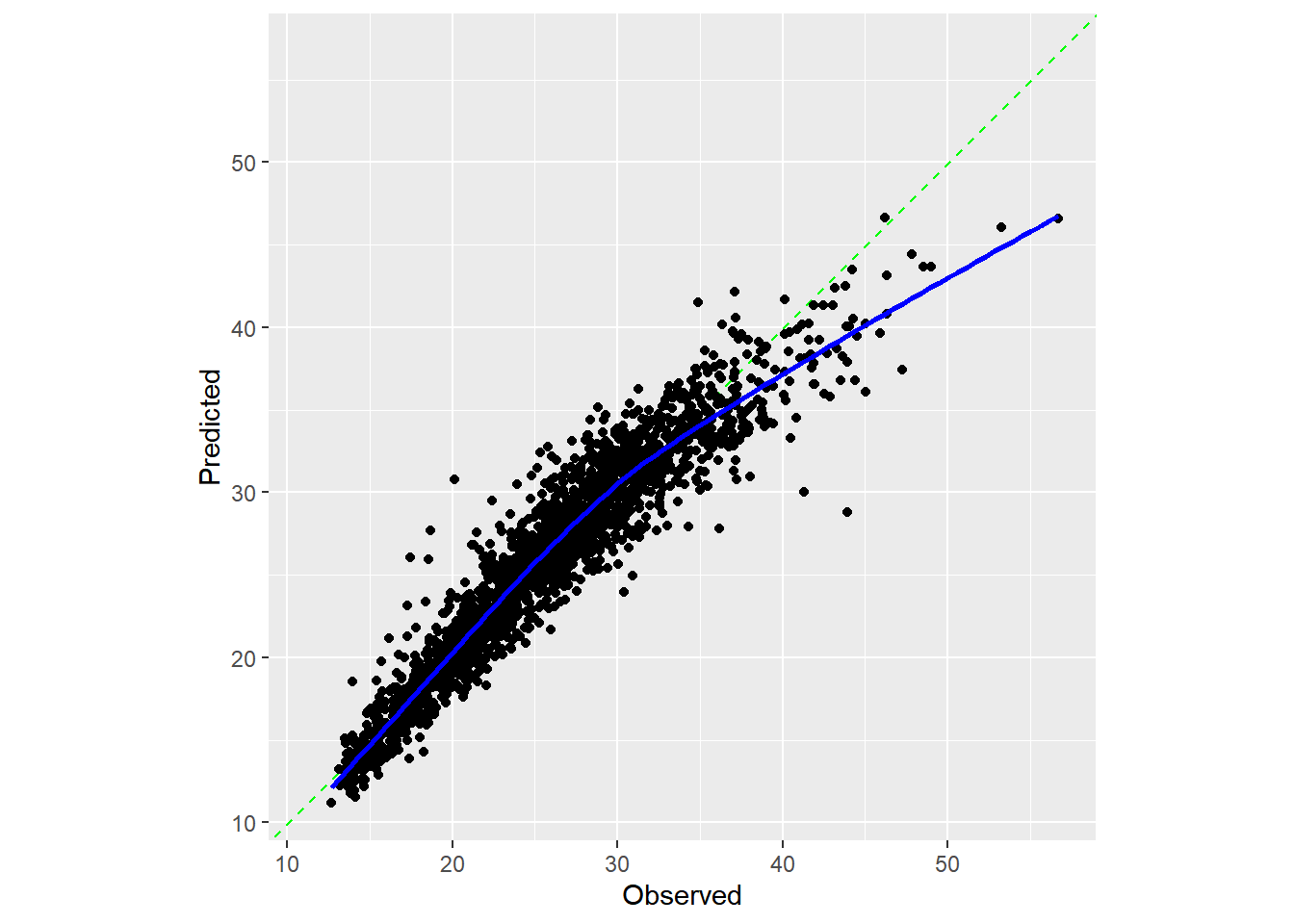
  • 最佳情况是数据点能紧密排列在对角线上。该模型对极短时长的配送预测略有不足,但对超过 40 分钟的配送则存在显著低估。不过总体而言,该模型对大多数配送情况都能有效运作。
  • 接下来的操作应该是重点分析预测效果不佳的样本,探究它们是否存在共同特征。例如:这些样本是否集中在周五晚间短距离订单等特定场景?若发现规律,我们将通过添加模型项来修正缺陷,并观察验证集均方误差(MAE)是否下降。整个过程将循环进行:先对残差进行探索性分析,再增减特征量,最后重新拟合模型。

1.4 测试集结果

lm_reg_fit <- fit(lm_reg_wflow, data = delivery_train)
lm_reg_test_pred <- augment(lm_reg_fit, new_data = delivery_test)
lm_reg_test_pred |>
  reg_metrics(truth = time_to_delivery, estimate = .pred)
# A tibble: 1 × 3
  .metric .estimator .estimate
  <chr>   <chr>          <dbl>
1 mae     standard        1.61
# plot the results
lm_reg_test_pred |>
  cal_plot_regression(truth = time_to_delivery, estimate = .pred)

以上代码可以使用tune::last_fit()函数简化。

lm_reg_test_res <-
  lm_reg_wflow |>
  last_fit(delivery_split, metrics = reg_metrics)

# 提取评估指标
collect_metrics(lm_reg_test_res)
# A tibble: 1 × 4
  .metric .estimator .estimate .config        
  <chr>   <chr>          <dbl> <chr>          
1 mae     standard        1.61 pre0_mod0_post0
# 提取预测值
collect_predictions(lm_reg_test_res)
# A tibble: 2,004 × 5
   .pred id               time_to_delivery  .row .config        
   <dbl> <chr>                       <dbl> <int> <chr>          
 1  16.0 train/test split             18.0     7 pre0_mod0_post0
 2  16.0 train/test split             17.6    14 pre0_mod0_post0
 3  27.6 train/test split             26.7    16 pre0_mod0_post0
 4  17.2 train/test split             17.6    29 pre0_mod0_post0
 5  32.2 train/test split             32.2    33 pre0_mod0_post0
 6  20.2 train/test split             20.3    34 pre0_mod0_post0
 7  29.2 train/test split             30.5    35 pre0_mod0_post0
 8  18.8 train/test split             20.6    43 pre0_mod0_post0
 9  25.5 train/test split             24.9    44 pre0_mod0_post0
10  22.6 train/test split             22.3    49 pre0_mod0_post0
# ℹ 1,994 more rows
# final model fit
lm_reg_fit <- extract_fit_parsnip(lm_reg_test_res)
lm_reg_fit |>
  tidy()
# A tibble: 114 × 5
   term        estimate std.error statistic  p.value
   <chr>          <dbl>     <dbl>     <dbl>    <dbl>
 1 (Intercept)   13.3      1.58        8.42 4.66e-17
 2 item_01        1.24     0.103      12.1  3.50e-33
 3 item_02        0.646    0.0687      9.41 6.85e-21
 4 item_03        0.731    0.0691     10.6  6.46e-26
 5 item_04        0.282    0.0626      4.50 6.78e- 6
 6 item_05        0.584    0.0787      7.42 1.36e-13
 7 item_06        0.525    0.0720      7.29 3.46e-13
 8 item_07        0.506    0.0710      7.13 1.10e-12
 9 item_08        0.638    0.0672      9.49 3.42e-21
10 item_09        0.737    0.0758      9.72 3.51e-22
# ℹ 104 more rows
# plot the results
cal_plot_regression(lm_reg_test_res)